 MindMesh
Inbox
One inbox for email across every connected account
Without tab chaos. MindMesh brings your connected mail into one focused workspace so you can scan faster and stay on top of what matters.
Stop switching tabs to find the right thread.
Connected email accounts land in one calm list. Filter by mailbox when you need to isolate an address, then jump back to the full view without leaving MindMesh.
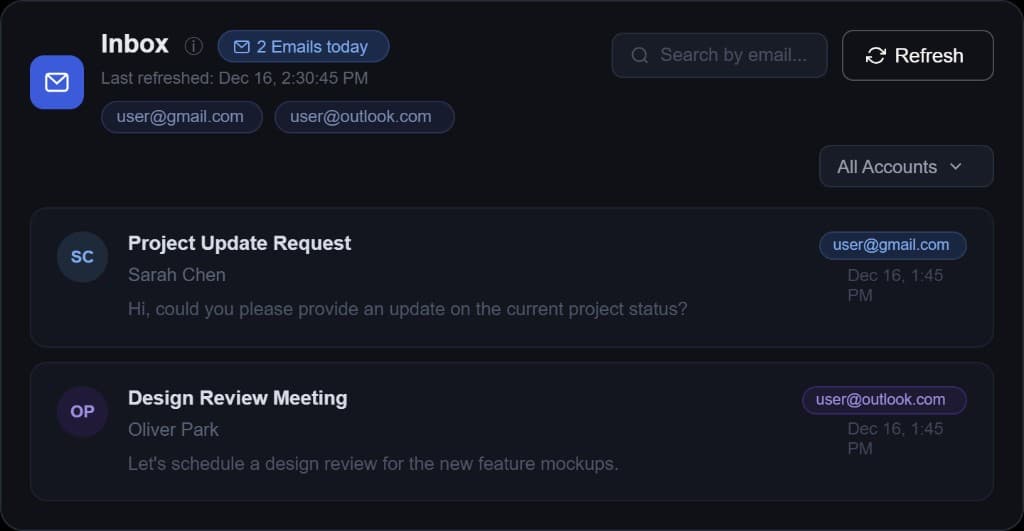
Built for how email actually shows up at work.
Inbox sits in the Prioritize and Execute path: the same signals that feed Focus and the draft you send from Execute.
One view across accounts
Connect Gmail, Outlook, and SMTP mailboxes, then scan everything in a single focused list instead of hopping between tabs.
Filter when you need one mailbox
Isolate a single address when several accounts are connected. Switch filters without signing out or losing context.
Plain-English search
Find receipts, contracts, and follow-ups by asking naturally. Get to the right thread without remembering exact senders or keywords.
Less triage, more clarity
Inbox is built to cut mental overhead so important messages surface faster and the day feels manageable.
Email visibility with privacy-first design.
MindMesh uses a local-first, privacy-conscious architecture. It organizes and retrieves your connected work context with care, without turning your inbox into a data product.